
What Is a 2D Barcode? Types, Uses & GS1 Formats (2026)
The short answer
A 2D barcode stores data in a pattern of squares or dots that a scanner reads both horizontally and vertically, so it holds far more than a traditional 1D barcode. The best-known type is the QR code. If you need a 2D barcode that opens a link when someone scans it with a phone, you can make one free with the QR Code Rabbit generator. Retail and supply chain labels use stricter GS1 formats, covered below.
On this page
- 1 · What is a 2D barcode?
- 2 · What are the main types of 2D barcodes?
- 3 · What are GS1 2D barcode formats?
- 4 · Where are 2D barcodes used?
- 5 · Which 2D barcode should you use?
- 6 · How to make a QR code with QR Code Rabbit
- 7 · Common mistakes
- 8 · FAQ
- 9 · The bottom line
Section 01
What is a 2D barcode?
A 2D barcode is a machine-readable image that encodes data across both its width and its height. A 1D barcode, like the stripes on a grocery item, encodes data in one direction only and usually carries just a number.
According to GS1 UK, a 2D barcode can hold over 7,000 characters, versus up to 2,000 for a 1D code, and it can be scanned in any orientation by an image-based scanner or a smartphone camera. QR Code Rabbit generates one kind of 2D barcode, the QR code. A single QR code can carry a web address, text, a phone number or a payment link, and dynamic QR codes can be edited after printing without changing the printed pattern. All 2D barcodes include built-in error correction (Reed-Solomon), so a scratched or partly covered code often still scans. That combination of density, any-angle scanning and damage tolerance is why 2D codes are replacing 1D codes on products, tickets and labels.
| 1D barcode | 2D barcode | |
|---|---|---|
| Data direction | One (horizontal) | Two (horizontal and vertical) |
| Typical content | A number, such as a product ID | Numbers, text, URLs, batch and expiry data |
| Capacity (GS1 UK) | Up to 2,000 characters | Over 7,000 characters |
| Scanner | Laser or imager | Imager or phone camera, any orientation |
| Example | EAN / UPC on retail packs | QR Code, Data Matrix |
Section 02
What are the main types of 2D barcodes?
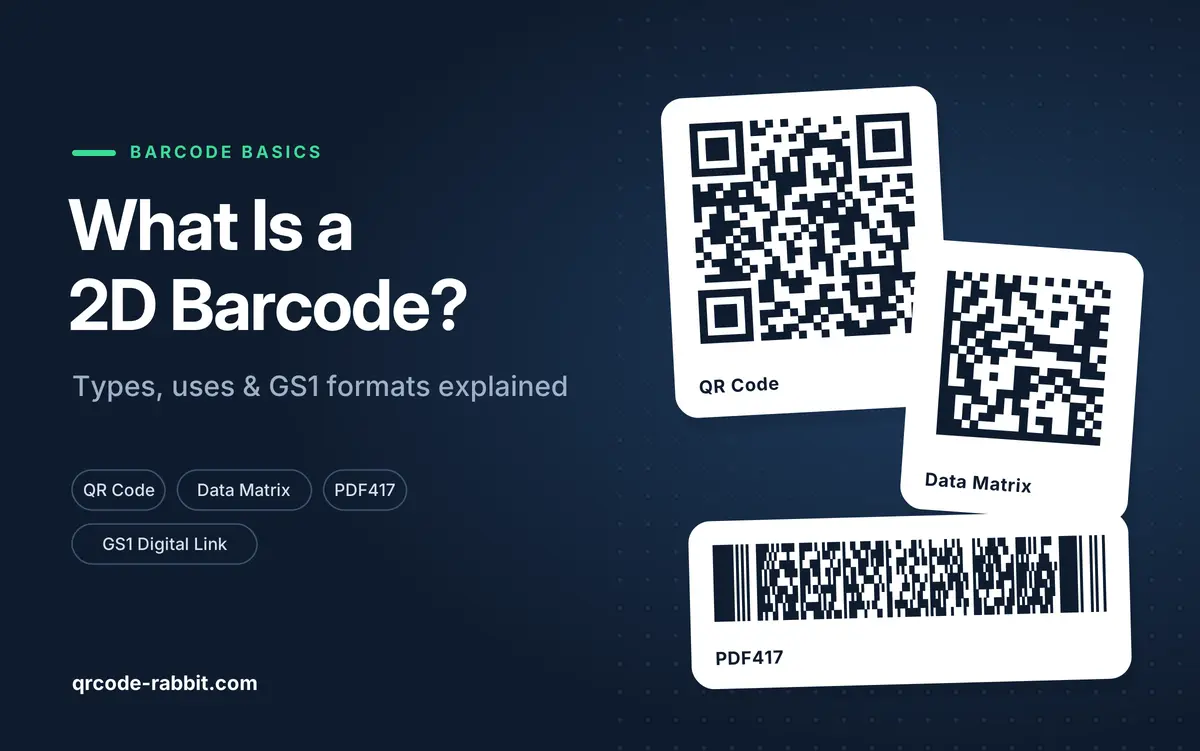
The four you will meet most often are the QR code, Data Matrix, PDF417 and Aztec. They differ in shape, capacity and who typically uses them. Capacities below are the maximums from each symbology's specification and assume the lowest error correction; real codes hold less.
| Type | Looks like | Max capacity (approx.) | Typical use |
|---|---|---|---|
| QR Code | Square with three corner squares | 7,089 digits or 4,296 letters and digits | Marketing, payments, menus, product links |
| Data Matrix | Square or rectangle, solid L-shaped edge | 3,116 digits | Small parts, electronics, medicines |
| PDF417 | Stacked rows, wide and short | About 2,700 digits | Boarding passes, driver licences, shipping |
| Aztec | Square with a central bullseye | About 3,800 digits | Rail and airline tickets |
The QR code is the one built for phones. Nearly all phone cameras read it with no app, and iPhone (iOS 11 and later) and most Android phones scan it from the native camera. Data Matrix wins when space is tiny, because it stays readable at very small sizes. "QR Code" is a registered trademark of DENSO WAVE INCORPORATED, which invented it in 1994.
Section 03
What are GS1 2D barcode formats?
GS1 is the standards body behind retail barcodes. It approves three 2D formats: GS1 DataMatrix, Data Matrix with GS1 Digital Link, and QR Code with GS1 Digital Link, per its support guide. They differ in how the data is written, not just in shape.
| GS1 format | Data syntax | Best for |
|---|---|---|
| GS1 DataMatrix | GS1 element strings (like GS1-128) | Healthcare, fresh food, logistics |
| Data Matrix with GS1 Digital Link | Web-style GS1 Digital Link URI | Retail and web connection; not every phone camera reads it automatically yet |
| QR Code with GS1 Digital Link | Web-style GS1 Digital Link URI | Consumer engagement; GS1 calls it the current preference because most phone cameras scan it automatically |
The GS1 goal behind the move is for retail point-of-sale scanners worldwide to be able to scan 2D barcodes by the end of 2027, per the GS1 2D barcodes FAQ. It is a readiness target, not a ban: GS1 says EAN/UPC and other 1D barcodes are "not going away anytime soon", and a product sold at retail still needs a 1D barcode until the transition is complete.
Important: a regular QR code made in any generator is not automatically a GS1 barcode. GS1 formats must follow GS1 syntax and the GS1 General Specifications, and brands usually get their numbers (GTINs) from GS1 itself. QR Code Rabbit does not generate GS1 Digital Link or GS1 DataMatrix codes, so for retail packaging use GS1-approved tooling.
Section 04
Where are 2D barcodes used?
Anywhere one code needs to carry more than a number. Marketing and hospitality use QR codes for menus, links and tickets. Manufacturing and healthcare use Data Matrix for small parts and labels. Packaging uses both to carry batch, lot and expiry data alongside a link. For the business uses QR Code Rabbit supports, these are the common ones:
- Restaurants and cafés: touchless digital menus and table QR codes.
- Retail and eCommerce: packaging QR codes, coupons and loyalty programs.
- Events: tickets and schedules, with scheduled activation and expiry for time-limited codes.
- Real estate: virtual tours on for-sale signs and agent contact cards.
- Marketing: campaign tracking with UTM parameters on posters and print.
For a link-based use like these, start with the URL QR code generator.
Section 05
Which 2D barcode should you use?
Pick by what the code must do and who scans it. If customers scan with a phone, use a QR code. If a factory or hospital scans tiny labels with industrial readers, Data Matrix is the usual answer. If the code goes on a retail product for point-of-sale, follow GS1 rules and your retailer's requirements.
| If you need to… | Use |
|---|---|
| Send people to a web page from a poster, menu or flyer | QR code |
| Change the destination after printing | Dynamic QR code (needs an account) |
| Mark very small parts or components | Data Matrix |
| Put a barcode on a retail pack | GS1 format from GS1-approved tooling, plus a 1D barcode for now |
Static or dynamic matters for QR codes. A static QR code encodes the content directly, is free forever and never expires. A dynamic QR code points to a short link you can edit, so you can fix a typo or change the destination without reprinting, and it comes with scan analytics. QR Code Rabbit's free plan includes 3 dynamic QR codes with unlimited scans, plus a 15-day free trial of paid features. Read more in our guides to static QR codes and dynamic QR codes.
Section 06
How to make a QR code with QR Code Rabbit
Creating a QR code takes three steps and no signup for static codes.
- 1
Open the QR Code Rabbit generator and choose static or dynamic, then the content type.
- 2
Fill in the content form, such as your URL.
- 3
Design it: colors, shapes, frame and logo, with a live preview. Keep error correction at H (30%) if you add a large logo.
- 4
Download as PNG (free, no account), or SVG with a free account.
Before printing, check the basics: a minimum size of 2 × 2 cm for close range (about 1 cm of code per 10 cm of scan distance on signage), and a quiet zone, a white border of at least 4 modules. You can test any code with the free QR code scanner. For deeper technical detail, see our definitive technical guide to QR codes.
Make your own 2D barcode in a minute
No signup for static · No credit card · No watermarks
Create a QR code →Section 07
Common mistakes
- Assuming any QR code is a GS1 code. Retail barcodes need GS1 syntax; a generic URL QR code will not work at a till.
- Removing the 1D barcode too early. GS1 says it is still needed for retail point-of-sale until the transition is complete.
- Printing too small or without a quiet zone. Keep at least 2 × 2 cm and a 4-module white border.
- Low contrast or an oversized logo. Use dark-on-light colors and error correction level H with logos.
- Printing a static code for something that will change. Use a dynamic QR code so you can edit the destination without reprinting.
- Never testing. Scan every code on an iPhone and an Android phone before it goes to print.
FAQ
Is a QR code a 2D barcode?
Yes. A QR code is the most widely used 2D barcode. It stores data in a grid of squares and can be scanned from any angle, including by a phone camera.
What is the difference between a 1D and 2D barcode?
A 1D barcode encodes data in one direction and usually holds just a number. A 2D barcode encodes data horizontally and vertically, so it holds far more, such as URLs, batch numbers and expiry dates.
What is the difference between Data Matrix and GS1 DataMatrix?
Data Matrix is the symbol itself. GS1 DataMatrix is Data Matrix encoded using GS1 element string syntax, so retail and healthcare systems can read standard fields such as GTIN, batch and expiry.
Will 2D barcodes replace UPC and EAN barcodes?
Not soon. GS1's goal is for retail scanners to read 2D barcodes by the end of 2027, in addition to 1D codes. GS1 says EAN/UPC barcodes are not going away anytime soon.
Can I make a 2D barcode for free?
Yes. On QR Code Rabbit you can create unlimited static QR codes free, with no watermark and no signup. The free plan also includes 3 dynamic QR codes.
The bottom line
A 2D barcode packs data into a grid you can scan from any angle, and the QR code is the type built for phones. For marketing and everyday links, make a QR code; for retail packaging, follow GS1's 2D formats and keep the 1D barcode until your retailers confirm otherwise.
Sources: GS1 2D barcode guidance and FAQ (checked October 2026). QR Code is a registered trademark of DENSO WAVE INCORPORATED.
What You Will Find on the QR Code Rabbit Blog
We publish practical guides, plain-language explainers, and occasional news about QR adoption and security. The audience is shop owners, marketers, teachers, and developers who use QR codes in real projects — not theory for its own sake.
How-to articles
Step-by-step pieces for menus, badges, packaging, forms, UPI labels, and social profiles. Most include sizing tips and a short testing checklist.
Knowledge base posts
Capacity limits, error correction, static vs dynamic architecture, and how scan tracking works — written so non-developers can follow, with enough depth for integrators.
News and security
Retail and fintech adoption stories, product updates, and reminders about quishing and safe scanning habits as QR usage grows.
Resources and templates
Campaign checklists, design consistency notes, and pointers for teams rolling QR out to many locations or via API.
New posts regularly
Browse by category — how-to, knowledge base, news, resources — or read everything on the main blog index. No paywall, no login required.