
Link to QR Code
Convert Links to QR CodesDesign, Generate, and Track All in One Place
How to Create a Free QR Code in Under 60 Seconds
QR Code Rabbit is the easiest free QR code generator online — no design skills or signup required. Generate a custom QR code for any URL, PDF, WhatsApp number, social media profile, or Wi-Fi network in 4 simple steps.
Choose Your QR Type
Select from URL, vCard, PDF, Email, SMS, Social Media, Wi-Fi, or 10+ more QR code types. Pick static for free unlimited use or dynamic for tracking and editing.
Customize Your Design
Add your brand logo, choose colors, patterns, and eye styles. Create a stunning, on-brand QR code in seconds that gets up to 70% more scans than plain black-and-white codes.
Download & Share
Download in PNG or SVG format — perfect for both digital use and high-resolution print. Share on packaging, business cards, flyers, menus, billboards, and more.
Track Every Scan
With dynamic QR codes, monitor real-time scan data — total scans, location, device type, and time. Edit the destination URL anytime without reprinting. No extra cost.
20+ QR Code Types
What Types of QR Codes Can You Create for Free?
QR Code Rabbit supports 15+ content types. All static QR codes are 100% free, never expire, and require no account — create and download in under a minute.

URL
Turn any website link into a scannable QR code. Perfect for landing pages, product listings, and digital menus.

Plain Text
Encode any message, promo code, or instruction. Works completely offline — no internet needed to scan.

Pre-fill recipient, subject, and message body. One scan opens a ready-to-send email on any device.

Phone
Let customers call you in one tap. Ideal for business cards, shop windows, and service signage.

SMS
Pre-fill a number and message body. Customers tap Send — no typing, no internet connection required.

Share your Instagram profile from any printed material. Grow followers from packaging, events, and more.

Twitter / X
Drive Twitter followers from business cards, conference lanyards, and offline print campaigns instantly.

YouTube
Link to your channel, a video, or a playlist. Convert offline audiences into subscribers with one scan.

Crypto
Encode your wallet address for BTC, ETH, and more. Accept crypto payments safely from any device.

UPI
Accept instant UPI payments via GPay, PhonePe, Paytm, and BHIM. Print once, collect forever.
Need a different type? We support Wi-Fi, vCard, WhatsApp, PDF, MP3, Video, and more.
See all QR typesWhich QR Code Type is Right for You?
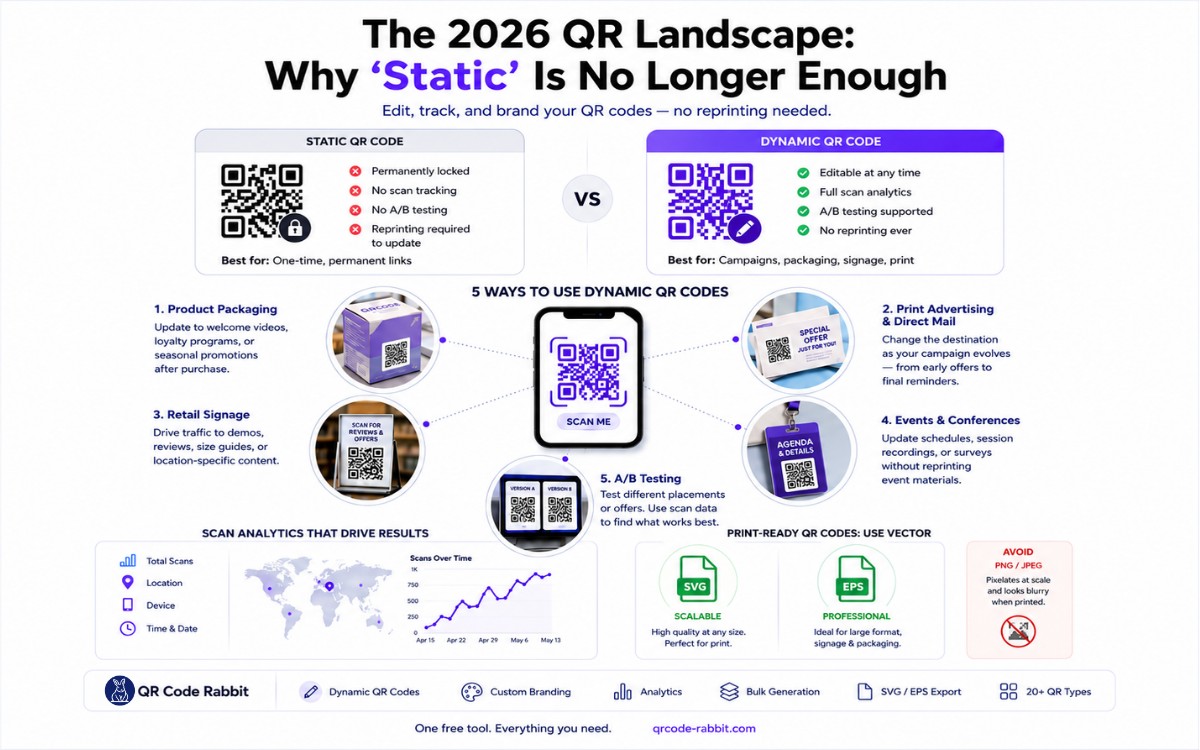
Static QR codes are perfect for permanent, one-time use. Dynamic QR codes are the powerhouse choice — edit, track, and optimize without ever reprinting.
Static QR Code
100% Free ForeverGenerate unlimited static QR codes at no cost — ideal for business cards, product packaging, menus, or anywhere content won't change.
- Always free, no account needed
- Never expires, unlimited scans
- URL, Text, Email, SMS, vCard & more
- Custom logo & brand colors
- PNG & SVG vector download
- Edit destination after printing
- Scan analytics & reporting
- Track location, device & time
- A/B campaign testing
Dynamic QR Code
Advanced AnalyticsThe professional choice. Update destinations, A/B test campaigns, and get detailed insights — all from one QR code, without reprinting.
- Everything in Static, plus:
- Edit destination URL anytime
- Real-time scan analytics dashboard
- Location, device & OS tracking
- Scan history & CSV export
- A/B testing across campaigns
- Password-protected QR codes
- Bulk QR code generation
Side-by-side feature comparison
| Feature Capability | Static QR Code | Dynamic QR Code |
|---|---|---|
| Cost | Free forever | Free / Pro |
| Edit after printing | ||
| Scan analytics & metrics | ||
| Device & city tracking | ||
| Expiration / limits | None | Configurable |
| Custom short URL | ||
| Best for | Permanent print | Campaigns & business |
Pro tip: If you are printing high-volume materials (billboards, packaging, or 1,000+ flyers), always choose dynamic. You can change your landing page URL anytime without paying to reprint.
All the Dynamic QR Features
Others Charge For — Free
Others charge $5–$16/month just to edit a URL or view scan analytics. With QR Code Rabbit, you get all these powerful dynamic QR features — track scans, edit links, and analyze your audience — included in our free plan.
Edit URLs After Printing
Changed your landing page? Updated your offer? With dynamic QR codes, just update the destination URL in your dashboard. The printed QR code stays the same — forever.
✓ No reprinting costs everReal-Time Scan Analytics
See exactly who scans your QR code — total scans, unique scans, time of day, and scan trends over time. Make data-driven decisions to improve your campaigns.
✓ Live dashboard insightsLocation & Device Tracking
Track the city, country, and region of every scan. Know whether your audience is on iOS or Android. Geo-target your QR campaigns for maximum local impact.
✓ Country, city & OS dataBulk QR Code Generation
Generate hundreds of QR codes at once using CSV upload. Perfect for product labels, event tickets, employee badges, or any use case requiring multiple unique codes.
✓ CSV upload & batch downloadPDF, File & vCard QR Codes
Link a QR code directly to a PDF brochure, digital business card, image gallery, or file download. Update the file anytime without issuing a new QR code to customers.
✓ PDF, image, vCard & morePassword-Protected QR Codes
Secure sensitive content behind a password. Only users who know the password can access the destination — perfect for exclusive offers, internal resources, or VIP content.
✓ Gate access with a passcodeReady to unlock all dynamic QR features?
Start free. No credit card. No watermark. Switch to dynamic QR codes anytime and get the full power of leading paid platforms — at a fraction of the price.
QR Codes for Every Industry & Use Case
From restaurants and retail to healthcare and real estate — QR Code Rabbit is used by businesses across 20+ industries to bridge offline and online experiences.
Touchless Digital Menus
Replace printed menus with a dynamic QR code. Update dishes, prices, and specials instantly — no reprinting needed. Customers scan and order from their phone.
Drive Offline-to-Online Traffic
Add QR codes to product packaging, shelf labels, and receipts. Link to product pages, discount coupons, loyalty programs, or video demos for instant engagement.
Seamless Check-Ins & Tickets
Issue digital tickets, manage check-ins, and share schedules with one scan. Dynamic QR codes let you update event info in real time without reprinting badges.
Paperless Patient Experience
Share appointment booking links, digital reports, prescription guides, and clinic directions via QR code. Speed up intake forms and reduce contact-based friction.
Smart Classroom Resources
Link QR codes to lesson materials, assignments, video lectures, and learning platforms. Teachers distribute resources with a single scan — no more USB drives or emails.
Instant Property Walkthroughs
Put QR codes on for-sale signs and brochures. Link buyers directly to virtual tours, floor plans, property videos, and agent contact info — available 24/7.
Measurable Print Campaigns
Track every flyer, billboard, and brochure campaign with dynamic QR codes. A/B test designs, monitor scan locations, and measure ROI without reprinting anything.
Promote Content Instantly
Link QR codes on merch, posters, and album art to Spotify playlists, YouTube videos, or event tickets. Update the link anytime to point to new releases.
Built for Trust, Speed & Security
QR Code Rabbit is engineered for businesses that rely on QR codes every single day. No surprise bills. No data lockups. No broken QR codes.
A Free QR Code Generator That Actually Stays Free
You have probably seen QR codes on menus, packages, and posters. What is less obvious is how many generators start free and then paywall basics like logos, SVG files, or scan counts. We built QR Code Rabbit so you can create and download static QR codes without an account, without a watermark, and without wondering when a feature will disappear behind a paywall. When you outgrow static codes, dynamic QR codes with analytics are there when you need them.
One tool for URLs, Wi-Fi, payments, and more
Pick a type, fill in your content, customise the design, download. That is the whole workflow. QR Code Rabbit covers URLs, plain text, email, SMS, phone numbers, vCards, Wi-Fi logins, PDFs, images, audio, video, social profiles, Google Forms, UPI IDs, crypto wallets, map coordinates, and app store links. Each type has its own page with examples so you are not guessing which format to use.
Make codes that look like yours, not a generic square
Black and white works, but most people scan branded codes more willingly. Add your logo, pick colours that match your palette, change the dot style, and wrap the code in a frame that says something useful like Scan for Menu. On the free plan you get all of that for static codes. Download PNG without signing up.
Static codes that do not expire on you
Static QR codes on QR Code Rabbit have no scan cap and no expiry date. Print them on a business card today and they still work in five years, as long as the linked phone number, URL, or file is still valid. That is why they suit signage, packaging, and anything you do not expect to change often.
Dynamic codes when the link needs to move
Printed a thousand flyers and then changed your landing page? With a dynamic code you update the destination in your dashboard instead of reprinting. You also get scan counts, rough location data, device types, and timing patterns. Useful when you are running campaigns and need to know which poster actually got scanned.
Bulk creation and a built-in scanner
Upload a CSV when you need hundreds of unique codes for products, stores, or events. Paid plans add API access if you want generation inside your own app. And if you just need to check a code before you print, our free scanner at qrcode-rabbit.com/qr-code-scanner reads images, URLs, or your camera feed right in the browser.
Need Help?
Frequently Asked Questions
Everything you need to know about creating, customising, and managing QR codes with QR Code Rabbit.
QR Code Rabbit is a free QR code generator and best-in-class QR code maker available online. "QR code" stands for Quick Response Code — a 2D barcode developed by Denso Wave in 1994 that smartphones can scan in under a second. QR Code Rabbit lets you create QR codes for URLs, PDFs, WhatsApp, social media, UPI payments, Wi-Fi, vCards, and more. You can add your brand logo, customize colors and patterns, and download in PNG or SVG format — all for free, with no account required for static QR codes.
Yes. All static QR codes on QR Code Rabbit — including URL, plain text, email, SMS, phone, Wi-Fi, vCard, and crypto — are completely free to create with no expiry and no scan limits. Once generated, they are yours to keep forever. Dynamic QR codes with scan analytics and editable URLs are available on our free and paid plans. No credit card is ever required for the free tier.
Yes. Every QR code you generate with QR Code Rabbit — including custom-designed codes with your company logo — can be used freely for commercial purposes, including product packaging, marketing campaigns, business cards, menus, and event materials. There are no royalties or licensing fees.
No. Static QR codes generated on QR Code Rabbit have zero scan limits and never expire. You can print them on packaging, billboards, or business cards and they will work indefinitely, with no caps on the number of scans.
Absolutely. QR Code Rabbit includes a full design editor: upload any image as a logo to embed in the center of your QR code, choose custom foreground and background colors, pick from multiple dot patterns and eye shapes, and add a branded call-to-action frame. Custom-designed QR codes get up to 70% more scans than plain black-and-white codes — all customization is free.
QR codes generated with QR Code Rabbit can encode: website URLs, plain text messages, email addresses (with subject and body), phone numbers, SMS messages, Wi-Fi network credentials, vCard contact details, UPI payment links, WhatsApp chat links, Instagram/Facebook/YouTube/Twitter profiles, Google Form links, PDF file links, and Bitcoin/Ethereum wallet addresses. Each QR code type has a dedicated generator page optimized for that content.
Still have questions?
Can't find the answer you're looking for? Our support team is happy to help.
.webp?dpl=dpl_BwHX5HqgRLAKruHHfV2WrW8MGBCg "Bitcoin QR Code Generator: Complete Guide to Dynamic BTC Payments (2026)")