

How-To

Step-by-step guides for every QR code use case

From generating your first QR code in under a minute to building advanced dynamic campaigns with scan analytics, our how-to guides walk you through every step. Whether you need to create a QR code for a restaurant menu, business card, product label, or event flyer, these tutorials cover it all — with screenshots, tips, and real-world examples.

  • Create QR codes for print and digital use
  • Customise with logos, colors, and frames
  • Track scans with dynamic QR code analytics
  • Best practices for sizing, placement, and testing
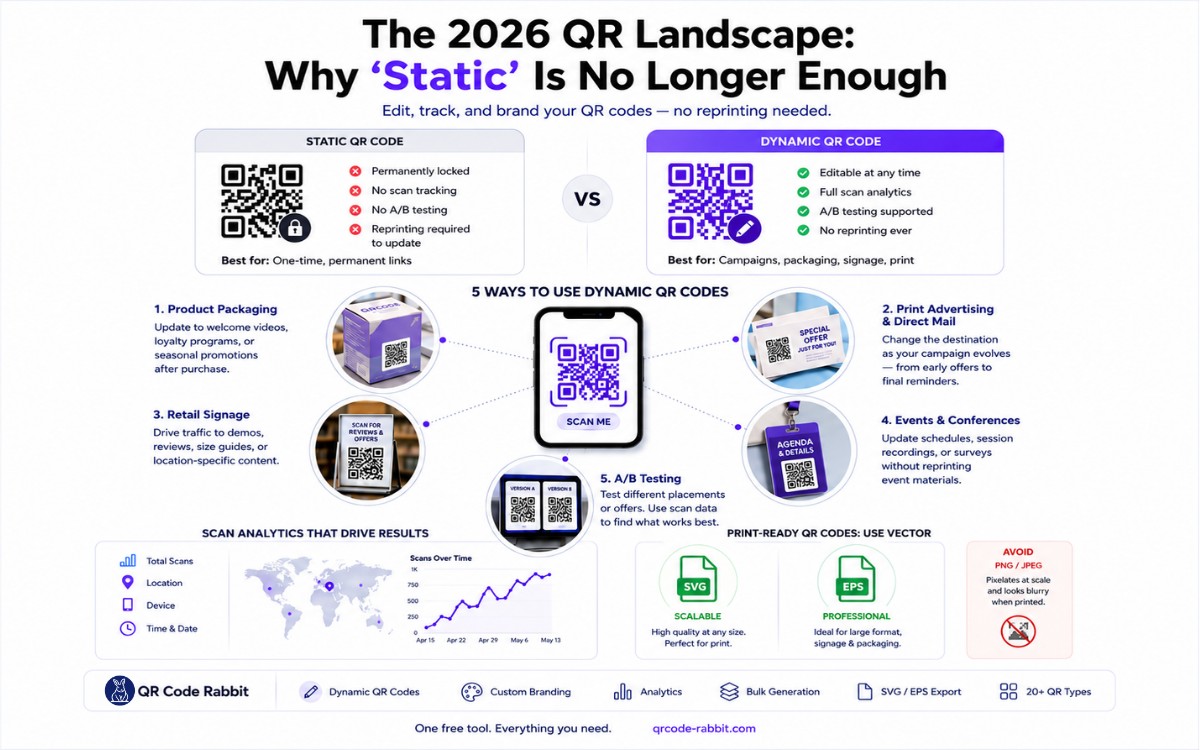
The 2026 QR Landscape: Why 'Static' is No Longer Enough
April 21, 202612 min read

The 2026 QR Landscape: Why 'Static' is No Longer Enough

How to Knowledge Base

Learn how to create free dynamic QR codes that you can edit, track, and brand — no reprinting needed. QR Code Rabbit gives you everything in one free tool. Updated April 2026.

What You Will Find on the QR Code Rabbit Blog

We publish practical guides, plain-language explainers, and occasional news about QR adoption and security. The audience is shop owners, marketers, teachers, and developers who use QR codes in real projects — not theory for its own sake.

How-to articles

Step-by-step pieces for menus, badges, packaging, forms, UPI labels, and social profiles. Most include sizing tips and a short testing checklist.

Knowledge base posts

Capacity limits, error correction, static vs dynamic architecture, and how scan tracking works — written so non-developers can follow, with enough depth for integrators.

News and security

Retail and fintech adoption stories, product updates, and reminders about quishing and safe scanning habits as QR usage grows.

Resources and templates

Campaign checklists, design consistency notes, and pointers for teams rolling QR out to many locations or via API.

New posts regularly

Browse by category — how-to, knowledge base, news, resources — or read everything on the main blog index. No paywall, no login required.