
Free vCard QR Code Generator — Share Your Contact Instantly
Design, Generate, and Track All in One Place
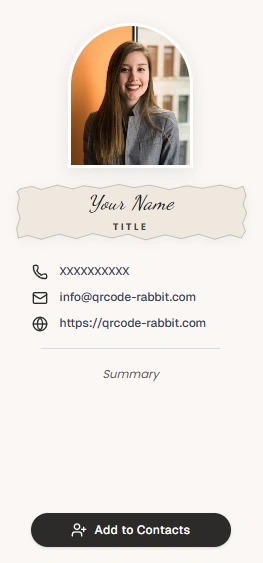
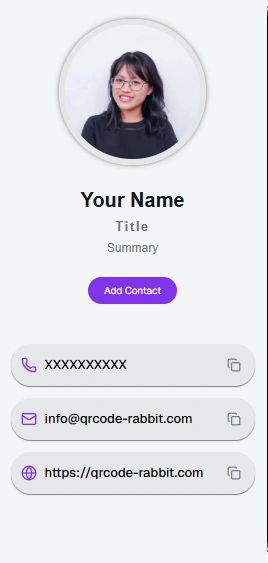
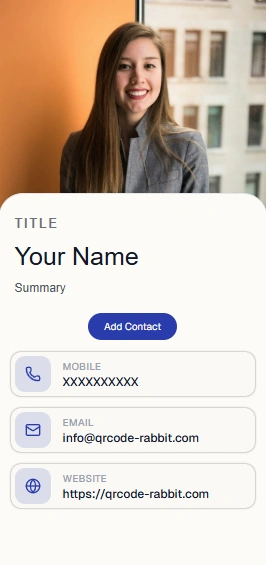
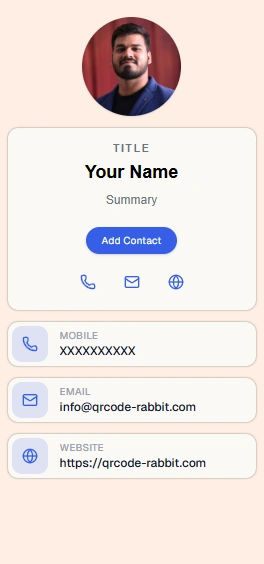
The Digital Business Card. One Scan. Instant Connection.
Never get caught without a business card again. Turn your contact details into an interactive, digital vCard that anyone can scan and save directly to their smartphone address book with a single tap—no special app required.
One-Tap Address Book Integration
Instantly exports your full contact profile—including phone numbers, email, company, title, physical address, and social handles—directly into Apple Contacts & Google Contacts.
Dynamic Real-Time Contact Updates
Changed jobs, phone numbers, or office locations? Update your vCard details anytime online without ever reprinting your QR code badge or business cards.
Universal Networking Ready
Share effortlessly on conference badges, email signatures, resume headers, LinkedIn banners, and smartphone lock screens.
Simple & Fast
How to Create a vCard QR Code in 3 Steps
No account needed. Turn your contact details into a scannable digital business card in under 60 seconds — completely free.
Enter your contact details
Add your name, job title, company, phone number, email, website, and social links. QR Code Rabbit packages everything into a standard vCard file.
Customise your vCard QR code
Upload your headshot or company logo, choose brand colours, select a dot pattern, and add a frame with a prompt like "Scan to Save Contact".
Download and start networking
Export as a print-ready PNG or scalable SVG. Print it on your business card, badge, or email signature — anyone who scans saves your full contact card in one tap.
Why vCard QR Codes?
Everything you need from a free vCard QR code generator
Share your complete contact card with one scan — no typing, no business card left behind, no lost connections.
One scan saves your full contact card
Name, title, company, phone, email, website, and social links are saved directly to the scanner's phone contacts — no manual typing, no transcription errors.
Update your details without reprinting
Changed your phone number, job title, or company? With a dynamic vCard QR code, update your details instantly — your printed card stays valid forever.
Branded with your logo & colors
Add your headshot or company logo, choose brand colours, and select a dot pattern. Your vCard QR code looks like a premium digital business card.
Scan analytics & engagement data
Track how many people saved your contact, when, and from where — useful insight for measuring networking events, conferences, and campaigns.
Works with every phone's contacts app
vCard is a universal standard supported natively by iOS and Android. No app install needed — the contact saves straight into the built-in Contacts app.
100% free — no hidden costs
Create unlimited static vCard QR codes at no cost. No watermarks, no scan limits, no expiry date, and no credit card required. Always free on QR Code Rabbit.
Why Modern vCard QR Codes Require Live Profile Hosting
Static offline business cards cannot be updated once printed. Dynamic digital business cards host your live profile, portfolio, and social links in one tap.
Live Digital Business Card with Real-Time Contact Updates
Live Profile & EditableA sleek mobile landing page hosting your full digital profile, social links, portfolio, and downloadable contact card.
Put your Dynamic vCard QR code on your metal or paper business card, conference badge, and email signature. When your position or phone number changes, your printed materials never go to waste.
Real-World Applications
Who uses vCard QR codes — and how
From networking events to email signatures, vCard QR codes turn any touchpoint into an instant, error-free contact exchange.
Business Cards & Networking Events
Print a vCard QR code on your business card or conference badge. New contacts scan and save your full details instantly — no typing, no lost paper cards.
Real Estate Agent Contact Cards
Agents add a vCard QR code to yard signs and listing flyers so prospective buyers can save their contact details on the spot, day or night.
Freelancers & Consultants
Independent professionals place a vCard QR code on proposals, invoices, or portfolio sites — clients save your contact and reach out with zero friction.
Conference Badges & Lanyards
Event organisers print vCard QR codes on attendee badges so networking at trade shows and conferences turns into saved contacts, not lost business cards.
Email Signatures
Add a vCard QR code image to your email signature. Recipients scan straight from their screen to save your full contact card to their phone.
Retail Staff & Store Contact Cards
Sales associates and stylists share a personal vCard QR code with customers so they can save the associate's direct line for future orders and support.
Ready to share your contact card with a single scan?
vCard QR Codes — Digital Business Cards
Paper cards get lost. A vCard QR code lets someone save your phone, email, title, and site to their contacts in a few seconds. Fewer typos, fewer follow-up emails asking for your details again.
Fields you can include
Name, company, role, phones, emails, address, website, notes. Static vCards embed the data in the code. Dynamic versions host a profile you can edit after printing.
Networking that moves fast
Badges, booth panels, and brochure backs work well in busy halls. Sales teams save a code image to their lock screen. Agents add codes to listing sheets so buyers store contact info while viewing photos.
Job changes without reprinting
Promotions, new numbers, and company moves happen. Dynamic vCards update from your dashboard while the code on your old card stock still works.
Print plus digital together
Many cards show traditional text on front and a code on back. NFC tags are nice but not universal; QR works on every modern smartphone.
Look professional
Headshot or logo in the centre, colours that match your brand, frame text like Save my contact. Details matter when the code is your first impression.
Explore More
More free QR code generators
QR Code Rabbit supports every QR code type — URLs, social profiles, payments, documents, and more. All free, no signup needed.
Image QR Code Generator
Turn a photo or gallery into a scannable QR code. Perfect for portfolios, listings, and visual menus.
Video QR Code Generator
Upload any MP4 or MOV file and share an instantly streamable QR code. Great for demos and virtual tours.
MP3 Audio QR Code Generator
Share podcasts, voice guides, or music tracks with a scannable audio QR code. No app required to listen.
Link Page QR Code Generator
Combine every important link — socials, store, portfolio — into one QR code that opens a single link page.
WiFi QR Code Generator
Connect guests to your WiFi network instantly without typing passwords. Supports WPA, WEP, and open networks.
URL QR Code Generator
Convert any website link into a scannable QR code. Ideal for landing pages, menus, portfolios, and any URL.
Frequently Asked Questions
Questions About vCard Contact QR Codes
How digital business cards work, device compatibility, and updating contact details.
A vCard QR code is a scannable image that encodes your contact information in the standard vCard format. When scanned, the recipient's phone offers to save your name, phone number, email, company, and social links directly to their contacts app.
Yes. Static vCard QR codes on QR Code Rabbit are completely free to generate and download with no scan limits, no expiry, and no account required.
No. The vCard format is supported natively by iOS and Android. Scanning with the built-in camera app opens a prompt to save the contact directly — no third-party app required.
Static vCard QR codes cannot be changed after generation. Use a dynamic vCard QR code to update your phone number, job title, or company at any time without reprinting.
Yes. Upload your headshot or company logo, choose custom colors, select a dot pattern, and add a frame with a prompt like "Scan to Save Contact" — all free on QR Code Rabbit.
You can include your full name, job title, company, phone number, email address, website, physical address, and social media profile links — everything needed for a complete digital business card.
Still have questions?
Can't find the answer you're looking for? Our support team is happy to help.